PDF Export for AI Agents
Well-designed PDFs from a single prompt. Describe what you need, get a professional document.
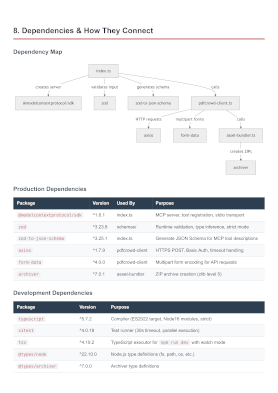
Analyze this project and create a comprehensive architecture overview PDF. Include component diagrams and data flow. Save to architecture-overview.pdf
See What It Creates
Real PDFs generated from a single prompt.
Setup
Pick your client and follow the steps below. Requires Node.js 18+.
/plugin marketplace add pdfcrowd/pdfcrowd-mcp-pdf-export
/plugin install pdfcrowd-export-pdf@pdfcrowd
claude mcp add --scope user pdfcrowd-export-pdf -- npx -y pdfcrowd-mcp-pdf-export
~/.claude.json or .mcp.json:{ "mcpServers": { "pdfcrowd-export-pdf": { "command": "npx", "args": ["-y", "pdfcrowd-mcp-pdf-export"] } } }
codex mcp add pdfcrowd-export-pdf -- npx -y pdfcrowd-mcp-pdf-export
~/.codex/config.toml:[mcp_servers.pdfcrowd-export-pdf] command = "npx" args = ["-y", "pdfcrowd-mcp-pdf-export"]
gemini mcp add -s user pdfcrowd-export-pdf npx -y pdfcrowd-mcp-pdf-export
~/.gemini/settings.json:{ "mcpServers": { "pdfcrowd-export-pdf": { "command": "npx", "args": ["-y", "pdfcrowd-mcp-pdf-export"] } } }
Your source code never leaves your machine; only the rendered document is sent to PDFCrowd for PDF conversion.
No credentials or signup needed — output includes a watermark. For watermark-free PDFs, sign up.
Already have an account?~/.pdfcrowd-mcp:PDFCROWD_USERNAME=your_username PDFCROWD_API_KEY=your_api_key
Or set environment variables PDFCROWD_USERNAME and PDFCROWD_API_KEY. Find your API key in account settings.
Example Prompts
A few ideas to get you started. The agent figures out paths, languages, and frameworks on its own — just describe what you need.
Documentation
Find the API route handlers and generate a PDF reference with endpoints, request/response examples, authentication requirements, and error codes. Save to api-reference.pdf
Explore the database layer and create a PDF documenting all tables, relationships, column types, and indexes. Include an ER diagram. Save to db-schema.pdf
Explore this codebase and create an onboarding PDF for new developers: project structure, setup instructions, architectural patterns, and common gotchas. Save to onboarding-guide.pdf
Code Analysis
Analyze the source code for quality issues, security concerns, and test coverage gaps. Generate a PDF report with findings, severity levels, and recommended fixes. Save to code-review.pdf
Find all TODO and FIXME comments in the codebase and create a tech debt PDF report grouped by priority. Save to tech-debt-report.pdf
Read the bug description in bug-login-timeout.md and the screenshots in screenshots/bug-login-timeout/. Create a bug report PDF with annotated screenshots and reproduction steps. Save to bug-login-timeout.pdf
Reports
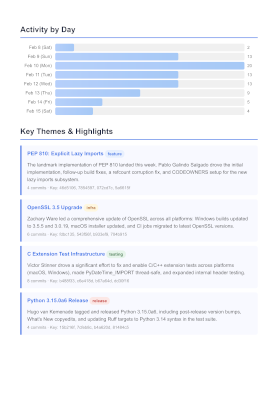
Analyze git commits from the last week and create a summary PDF: what changed, who contributed, active areas of the codebase, and work in progress. Save to weekly-summary.pdf
Analyze all commits since the last git tag and create release notes PDF. Group by: New Features, Improvements, Bug Fixes. Write for non-technical readers. Save to release-notes.pdf
Analyze the project dependencies and create a PDF report: direct vs transitive, outdated packages, known vulnerabilities, and update recommendations. Save to dependency-audit.pdf
Technical Documents
Analyze the project architecture and create a PDF: component diagram, data flow, key design decisions, and external dependencies. Include diagrams. Save to architecture-overview.pdf
We're planning a major refactor. Analyze the current codebase and create a migration plan PDF: affected files, step-by-step approach, risk areas, and rollback strategy. Save to migration-plan.pdf
Session Export
Store our conversation to a structured PDF summary: group by topic, highlight key decisions and rationale, include action items. Save to conversation-summary.pdf
Store our entire conversation to PDF as a verbatim transcript. Include every message in full. Save to conversation-transcript.pdf
Automation
Combine with claude -p for non-interactive use in scripts, cron jobs, and CI pipelines.
claude -p "Summarize my git commits from yesterday as a daily update PDF. Save to daily-update-$(date +%Y%m%d).pdf"
claude -p "Create a weekly progress report PDF from this week's commits. Save to weekly-report.pdf" && \
mail -s "Weekly Report" team@example.com -A weekly-report.pdf
# .git/hooks/pre-commit
claude -p "Regenerate api-reference.pdf from the current API route handlers."
These are just examples. If you can describe it, the agent can build it.
Getting Better Results
The agent handles layout automatically, but you can guide it.
Be specific about structure
Instead of "create a report", say "create a report with an executive summary, findings grouped by severity, and an appendix with raw data." The more structure you specify, the better the output.
Mention the audience
Saying "for non-technical stakeholders" or "for the security team" changes tone, detail level, and terminology. The agent adapts the document accordingly.
Request diagrams
The agent can include diagrams in the PDF — flow charts, sequence diagrams, entity relationship diagrams. Just ask: "include an ER diagram of the schema."
Control the scope
Point the agent at specific directories or files: Analyze src/auth/ is better than Analyze the codebase. Narrower scope means faster, more detailed results.
Use a template for consistent layout
Create an HTML template and reference it: "Use report-template.html as the layout and generate a weekly status report from this week's git history." The agent preserves your design and fills in the content.
Merge template with data
Provide a template with placeholders and a JSON data file: "Merge report-template.html with weekly-metrics.json." The agent maps data to placeholders — same structure every time, zero ambiguity.
Set a visual style
Add a style keyword: "Create a formal report", "Design a retro event poster", "Make a minimal invoice." The agent adapts the entire look — fonts, colors, spacing — to match.
Change page setup
The default is A4 portrait. Say "use landscape orientation" for wide tables or "use Letter page size" for US formatting. You can combine both: "landscape Letter."
Iterate on results
Not satisfied? Follow up: "Make the executive summary shorter" or "Add a table of contents." The agent refines the PDF in subsequent turns.
Not Just for Code
The same tool works for any PDF you can describe. A few examples from outside software development.
Education
Create a 20-question multiple choice quiz on world history (1900-1950) for high school students. Include an answer key on a separate page. Save to history-quiz.pdf
Create a professional certificate of completion for "Introduction to Data Science" awarded to Jane Smith, dated today. Use a formal full-bleed layout with a border. Save to data-science-certificate.pdf
Creative
Create a PDF visualizing the character relationships in [your favorite TV show / movie / book]. Use a diagram showing connections and key dynamics. Include a brief description of each character. Save to character-relationships.pdf
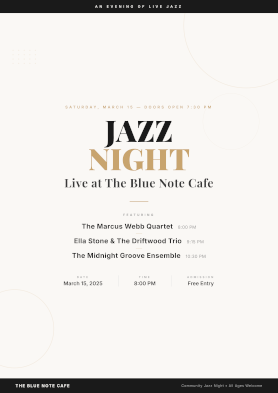
Create a single-page full-bleed event poster PDF for a community jazz night: Saturday March 15, 8 PM, The Blue Note Cafe, featuring 3 bands. Use bold typography and a clean layout. Save to jazz-night-poster.pdf
Business
Merge invoice-template.html with invoice-data.json to generate an invoice PDF. Save to invoice-acme-001.pdf
Here are my raw notes from today's meeting: [paste notes]. Format them as professional meeting minutes with attendees, decisions, and action items. Save to meeting-minutes-2026-02-10.pdf
Create a product catalog PDF using the photos in products/ and the descriptions in catalog-data.json. One product per page with photo, name, description, and price. Save to product-catalog-spring-2026.pdf
Personal
Create a 5-day travel itinerary for Tokyo: daily schedule with morning, afternoon, and evening activities. Include restaurant suggestions and transit tips. Save to tokyo-itinerary.pdf
Create a set of 6 recipe cards for quick weeknight dinners. Each card should have ingredients, steps, prep time, and serving size. Use a compact card layout. Save to weeknight-dinner-recipes.pdf