This guide shows how to add headers, footers, and page numbers to PDFs generated with PDFCrowd's HTML to PDF API. The API renders headers and footers from separate HTML templates and repeats them on the generated pages.
Create the header and footer
This header template displays a report title (header.html):
<!doctype html>
<html>
<head><meta charset="utf-8"></head>
<body style="margin: 0; font: 10pt sans-serif; color: #334155;">
  <div style="border-bottom: 1px solid #cbd5e1; padding-bottom: 6px;">
    Monthly report
  </div>
</body>
</html>
This footer template adds page numbers (footer.html):
<!doctype html>
<html>
<head><meta charset="utf-8"></head>
<body style="margin: 0; font: 9pt sans-serif; color: #334155;">
  <div style="text-align: right; border-top: 1px solid #cbd5e1; padding-top: 6px;">
    Page <span class="pdfcrowd-page-number"></span>
    of <span class="pdfcrowd-page-count"></span>
  </div>
</body>
</html>
PDFCrowd fills the two spans with the current page number and total page count. A two-page document gets “Page 1 of 2” and “Page 2 of 2”. The same placeholders work in the header.
Both templates can be styled with CSS and include images. Each is rendered separately from
the main document, so include its styles in the template itself. Use absolute URLs for external
stylesheets and images, and make sure PDFCrowd can fetch them. For example, a logo can use
<img src="https://your-domain.example/logo.png" alt="Company" style="height: 8mm;">.
Generate the PDF
The example below uses Python to load the templates and convert report.html to report.pdf.
The same templates and PDF settings work with any
supported client library or the
HTTP API.
To run it, install the Python client.
You can run the examples below with the included demo credentials, or replace
them with your PDFCrowd username and API key.
from pathlib import Path

import pdfcrowd

client = pdfcrowd.HtmlToPdfClient("demo", "demo")  # Username, API key
client.setPageSize("A4")
client.setPageMargins("15mm", "15mm", "15mm", "15mm")
client.setHeaderHeight("15mm")
client.setFooterHeight("12mm")

client.setHeaderHtml(Path("header.html").read_text(encoding="utf-8"))
client.setFooterHtml(Path("footer.html").read_text(encoding="utf-8"))

client.convertFileToFile("report.html", "report.pdf")
For a webpage input, the final conversion call would be:
client.convertUrlToFile("https://your-site.example/report", "report.pdf")
Replace the example URL with a page on your website that PDFCrowd can access.
setHeaderHtml() and
setFooterHtml() accept HTML strings,
including templates rendered by an application.
Passing HTML directly is more reliable because PDFCrowd does not need to fetch the templates
from a server. For hosted templates,
setHeaderUrl() and
setFooterUrl() are also available.
Conversion failures raise
pdfcrowd.Error.
Set heights and page margins
These methods control the page regions shown in the diagram:
setPageMargins()sets the gray outer bands. Its arguments are top, right, bottom, left, in that order. The diagram shows 15 mm on each side.setHeaderHeight()reserves the blue header area, between the top margin and the main content. The diagram shows 15 mm.setFooterHeight()reserves the blue footer area, between the main content and the bottom margin. The diagram shows 12 mm.
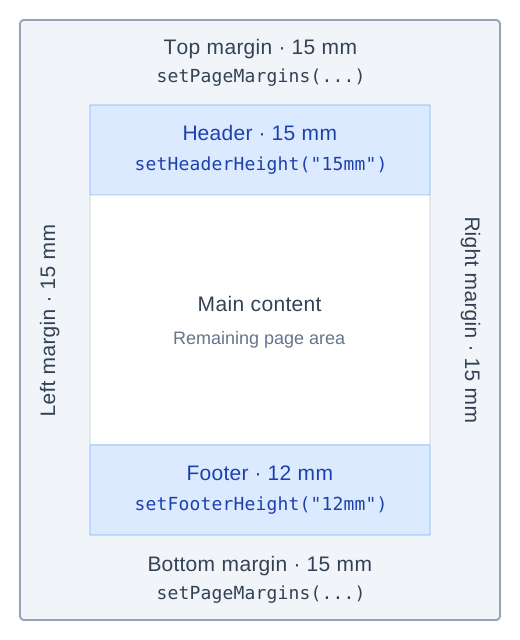
The margins, header, and footer are enlarged in this diagram to make the labels readable.
Header and footer heights are additional to the margins. A 15 mm top margin plus a 15 mm header puts the start of the main content area 30 mm below the top edge. Increasing either height or margin leaves less space for the main content.
Choose header and footer heights large enough for the template's text, images, borders, and padding. The reserved area does not grow automatically to fit a taller logo or another line of text.
Dimensions accept units such as mm, in, and pt; for example, "0.7in" means 0.7 inches.
Header and footer content normally respects the left and right page margins too. Keep
body { margin: 0; } in their templates to avoid an additional browser-default inset.
Add a link to the source page
When converting a webpage URL, put this element in the header or footer:
<a class="pdfcrowd-source-url" data-pdfcrowd-placement="href-and-content"></a>
PDFCrowd inserts the converted page's URL as both the link target and visible text. To display
a short label, use href instead:
<a class="pdfcrowd-source-url" data-pdfcrowd-placement="href">View original report</a>
For a local file or HTML string, there may be no public source URL. If a web version of the document is available, its URL can be added as a regular HTML link.
Page-number formats
For Roman numerals, add data-pdfcrowd-number-format="roman" to the page-number span:
<span class="pdfcrowd-page-number" data-pdfcrowd-number-format="roman"></span>
Apply the attribute to the page-count span too if you want a footer such as “Page I of III”. See the header/footer reference for other numeral formats and placeholder attributes.
Page-specific headers and footers
- Change the layout on selected pages. Per-page conversion settings can adjust margins and header/footer heights, or remove those areas entirely.
- Hide a header or footer without changing the layout.
setExcludeHeaderOnPages()andsetExcludeFooterOnPages()suppress their content on selected pages while keeping the reserved space. - Style headers and footers differently by page.
When enabled, CSS annotations
let you target the first or last page, odd/even pages, or a particular page count. For example,
body.pdfcrowd-page-firstselects the first page, andbody.pdfcrowd-page-count-1selects a single-page document. Use these selectors in the header or footer's CSS.
Troubleshooting
| Symptom | What to check |
|---|---|
| Text or a logo is clipped | Increase the header/footer height to include padding and borders, or reduce the template's dimensions. |
| Too much space above or below the document | Check both page margins and header/footer heights, then check margins and padding inside the HTML. |
| Header styling differs from the main document | Include the required CSS in the header/footer template; the main document's styles do not carry over. |
| An image or a URL-based template is missing | Check that its URL is reachable by PDFCrowd and that the response contains the expected image or HTML. |
| A page-number span is empty | Put the placeholder in the HTML passed to the header/footer methods and check the class spelling. |